
 Hyundai Accent: Aux, USB and iPod® port
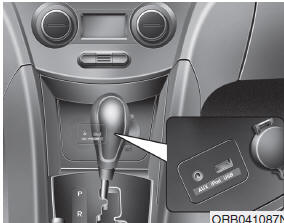
If your vehicle has an aux and/or USB(universal serial bus) port or iPod® port, you can use an aux port to connect audio devices and a USB port to plug in a USB, or use the HYUNDAI accessory iPod® cable the plugs into both ports to connect an iPod®.
 NOTICE
When using a portable audio device connected to the power outlet, noise may occur during playback. If this happens, use the power source of the portable audio device.
❈ iPod® is a trademark of Apple Inc.
 Cargo area cover
Use the cover to hide items stored in the cargo area.
The cargo area cover will be lifted when the tailgate is opened. Disconnect the
strap (1) from holder if you want to return the cover to orig ...
 Navigation system
The navigation system ascertains the present position of your vehicle by using
information from satellites and guides you to the place you assign as the destination.
Detailed information for the na ...
See also:
Tire traction
Tire traction can be reduced if you drive on worn tires, tires that are improperly
inflated or on slippery road surfaces. Tires should be replaced when tread wear
indicators appear. To reduce the ...
Fuel Filter. Repair procedures
Replacement
1.
Remove the fuel pump (Refer to “Fuel Pump� in this
group).
2.
Disconnect the electric pump wiring connector (A)
an ...
Removal and Installation
Water Pump
1.
Drain engine coolant.
System is under high pressure ...
Hyundai Accent Manuals
